Vhud 1.6.2









16,364
186
16,364
186
If you have any suggestions, feedback, or ideas for improving the mod, please come join my Discord server and let me know!
Same goes for any bugs, glitches, or issues you're running into with VHUD — the best place to report them and get help is on the Discord too. I'd really appreciate hearing from you there! 🚀
Need help with VHud on GTA 5 Enhanced? Contact me on Discord — I’ll assist you there.
v1.6.2
- All reported bugs fixed
- All New 4 Dealership with new UI
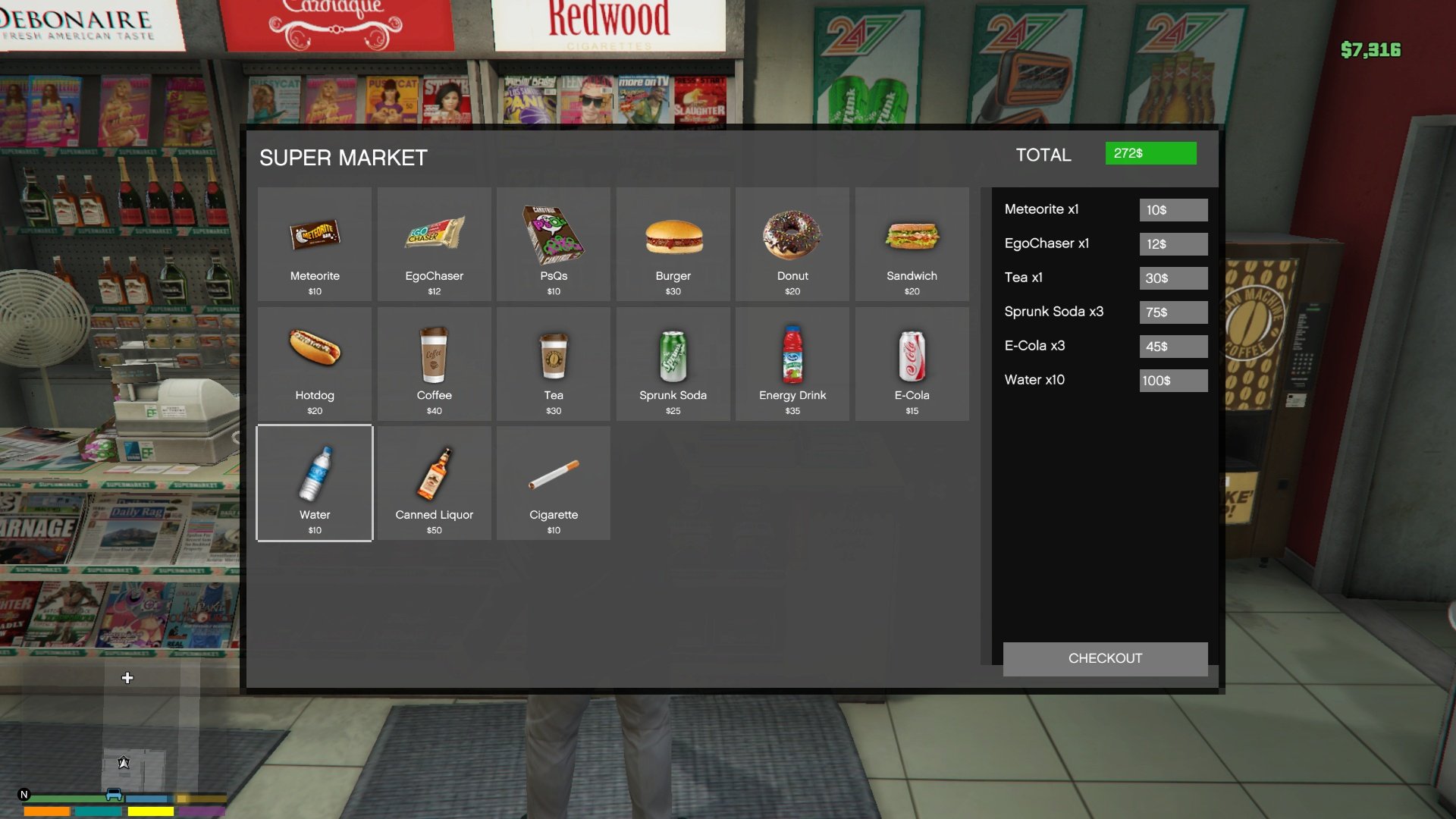
- All new Shops/Pharmacy UI
- All new Inventory UI with Drag and Drop Support
- Helicopter and Plane Hud
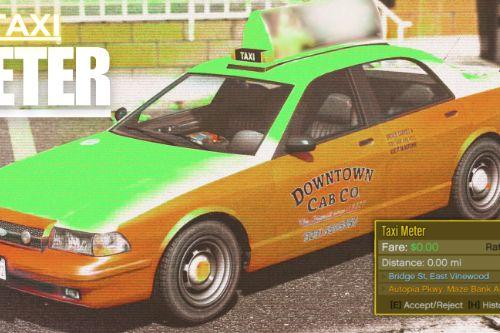
- Citizenship/Driving/Boat/Flying/weapon License Test
- Weapon Craft System
- New Custom Phone System (Works Radio, Camera, Calculator, Contact, Settings)
(Default Key: H) - Changeable on VHud/SPPhone/phone.ini
- TrafficControl Sytsem
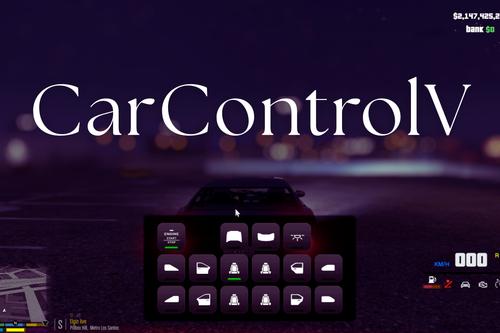
- Radial Menu (Default Key: K) - Changeable on VHud/radial.ini
- Hunting Job
- Black Market
- MoneyWash (Blackmoney to CleanMoney)
- MileageV system (Vehicle Mileage Monitoring, Engine Oil System, Oil Filter System, Air Filter System, Tire Wear System, Brake System, Suspension System & Mechanic Interaction System)
Note:
Those who install vhud v1.6.1 before, uninstall it. then install this vhud v1.6.2.
● Install addonprops and customanims dlc
● Install Dynasty8 MLO (New location will be add on the next update)
● Replace all YTD files.
● You can use your saved VEH_DB.bin, VEH_META.bin, CHR_DB.bin and CHR_META.bin
● Disable npcinteract on specific ped. edit script/VHud/npcinteract.ini
● If you want create your character again, then while in-game use Character Creator phone contact. OR, you can change before open game, just edit script/VHud/cbjmts/CHCreatorState.ini -> True/False
● Fridge inventory supports food/drink items. To interact fridge go near fridge then you can see Interact Msg. If you want food/drink item to store on fridge, just go near fridge open your Inventory and select your desired food/drink items, then it goes fridge inventory. then close your inventory and then open fridge menu and check.
To take food/drink item from fridge to Inventory, Open fridge menu and just select that item.
Credit all goes to these creators
- For Persistence Uses advanced persistence (by systematic) (already included with vhud v1.6.1)
- Uses PlayerCompanion (by justalemon) — supports money for custom peds. (already included with vhud v1.6.1)
------------------------------------------------------------------------------------------------------------------------------------------------------------------------------
Requirements for v1.6.2:
Installation v1.6.2
1. Put vhud.ytd, phonev.ytd, gymsytem.ytd, realestate.ytd and dealership_v.ytd here "Grand Theft Auto V\mods\update\update.rpf\x64\textures\script_txds.rpf\"
2. Then put all.dll with Vhud folder into the "scripts" folder
3. Install addonprops dlc
4. Install customanims dlc
5. Install Dynasty8 MLO
NOTE: Make Sure to change you preferrable key on vconfig.ini, fishing.ini, gym.ini, peds.ini, because default key is in mess (Sorry about that)
------------------------------------------------------------------------------------------------------------------------------------------------------------------------------
VHud is a comprehensive GTA V mod that introduces an advanced HUD system with customizable UI elements such as health, armor, hunger, thirst, and fuel bars. It allows players to interact with in-game stores and gas stations, providing functionalities like purchasing items and refueling vehicles. This mod also includes features for managing player inventory, seatbelt usage, and dynamic speedometer display.
KeyBindings:
Config Menu Key = F12 (To save settings, Just exit the menu using Back key)
Inventory Key = Tab (Changeable on vconfig.ini)
Seatbelt On/Off Key = B (Changeable on vconfig.ini)
Speedometer Unit Toggle Key = U
Features:
- Adjustable size and position for cash display, health bar, armor bar, hunger bar, thirst bar, fuel bar, and seatbelt indicator.
- Visibility toggles for various HUD components including health bar, armor bar, hunger bar, thirst bar, fuel bar, seatbelt bar, and speedometer.
- Health and armor tracking with visual indicators.
- Hunger and Thirst levels with gradual depletion and consumption effects.
- Starvation and exhaustion checks affecting player health.
- Inventory management allowing players to purchase and consume items. (e.g., Default Key is 'I')
- Item effects on food and water levels, including animations for item consumption.
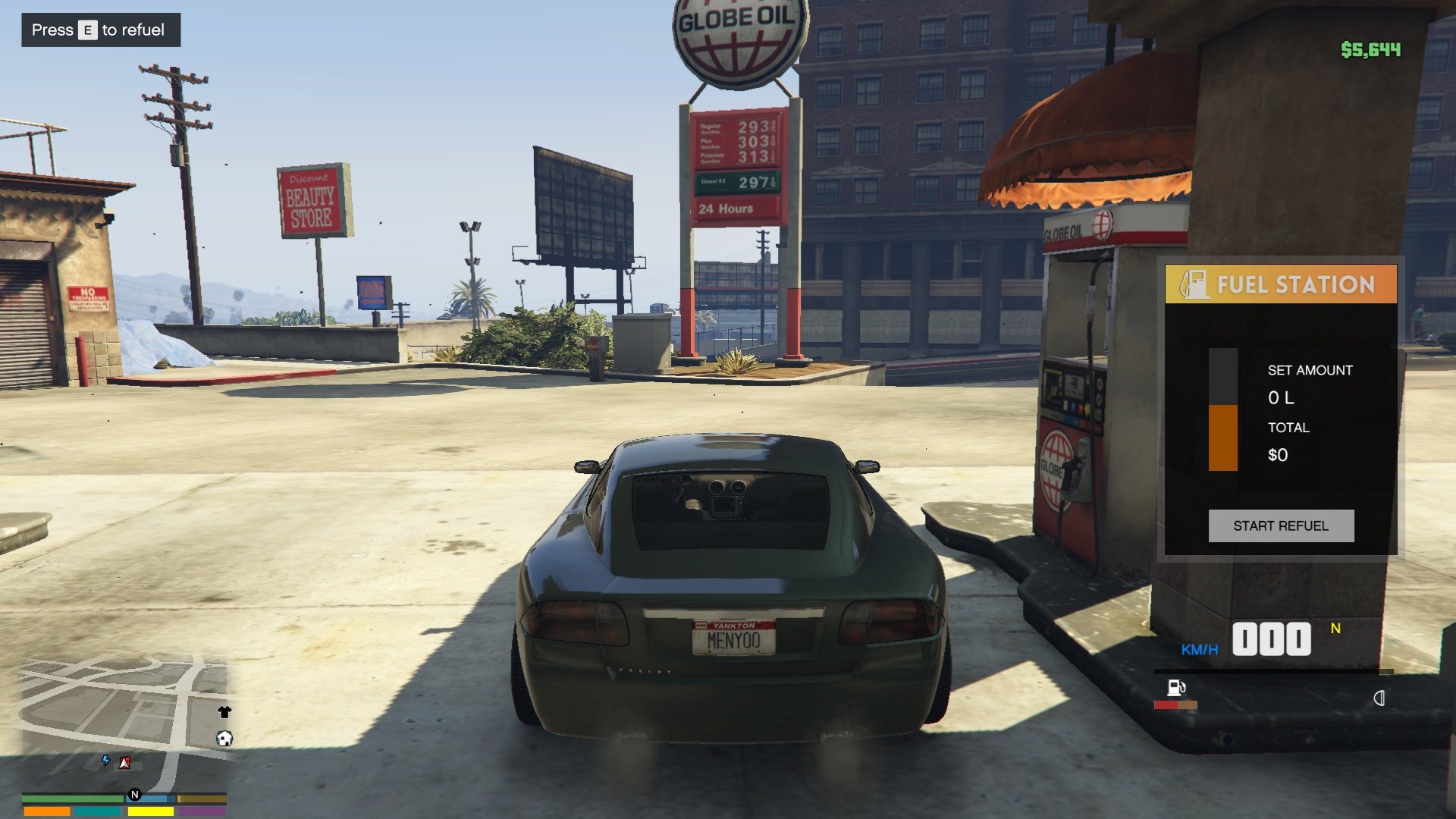
- Fuel level tracking and refueling mechanics at gas stations.
- Speedometer with switchable units (KM/H or MPH). (e.g., Default Key is 'U')
- Seatbelt functionality with visual and audio feedback. (e.g., Default Key is 'B')
- Store locations with background sprites and blips on the map.
- Purchase menu for buying food and drinks with corresponding price tags.
- Custom sound effects for seatbelt activation and deactivation.
- Configurable menus accessible via keybindings (e.g., F12 for main menu, E for shop menu).
- Progress bar animations for item consumption.
- Blips for store and gas station locations.
- Red Ground markers indicating gas pump locations.
- Configuration file for saving user settings and inventory state.
- Automatic saving of configuration changes and inventory updates.
- Texture loading for HUD icons and other visual elements.
Same goes for any bugs, glitches, or issues you're running into with VHUD — the best place to report them and get help is on the Discord too. I'd really appreciate hearing from you there! 🚀
Need help with VHud on GTA 5 Enhanced? Contact me on Discord — I’ll assist you there.
v1.6.2
- All reported bugs fixed
- All New 4 Dealership with new UI
- All new Shops/Pharmacy UI
- All new Inventory UI with Drag and Drop Support
- Helicopter and Plane Hud
- Citizenship/Driving/Boat/Flying/weapon License Test
- Weapon Craft System
- New Custom Phone System (Works Radio, Camera, Calculator, Contact, Settings)
(Default Key: H) - Changeable on VHud/SPPhone/phone.ini
- TrafficControl Sytsem
- Radial Menu (Default Key: K) - Changeable on VHud/radial.ini
- Hunting Job
- Black Market
- MoneyWash (Blackmoney to CleanMoney)
- MileageV system (Vehicle Mileage Monitoring, Engine Oil System, Oil Filter System, Air Filter System, Tire Wear System, Brake System, Suspension System & Mechanic Interaction System)
Note:
Those who install vhud v1.6.1 before, uninstall it. then install this vhud v1.6.2.
● Install addonprops and customanims dlc
● Install Dynasty8 MLO (New location will be add on the next update)
● Replace all YTD files.
● You can use your saved VEH_DB.bin, VEH_META.bin, CHR_DB.bin and CHR_META.bin
● Disable npcinteract on specific ped. edit script/VHud/npcinteract.ini
● If you want create your character again, then while in-game use Character Creator phone contact. OR, you can change before open game, just edit script/VHud/cbjmts/CHCreatorState.ini -> True/False
● Fridge inventory supports food/drink items. To interact fridge go near fridge then you can see Interact Msg. If you want food/drink item to store on fridge, just go near fridge open your Inventory and select your desired food/drink items, then it goes fridge inventory. then close your inventory and then open fridge menu and check.
To take food/drink item from fridge to Inventory, Open fridge menu and just select that item.
Credit all goes to these creators
- For Persistence Uses advanced persistence (by systematic) (already included with vhud v1.6.1)
- Uses PlayerCompanion (by justalemon) — supports money for custom peds. (already included with vhud v1.6.1)
------------------------------------------------------------------------------------------------------------------------------------------------------------------------------
Requirements for v1.6.2:
- Install nightly.113 or lower ScriptHookVDotNet3 Nightly. if you don't have it yet.
- Latest LemonUI. if you don't have it yet.
- Latest NativeUI. if you don't have it yet.
- Latest iFruitAddon2. if you don't have it yet.
- Recommended Dynasty8 MLO
- Recommended addonprop (custom electric prop, electric nozzle prop, food prop added)
- Recommended customanims (custom animation added)
- Recommended HeapAdjuster
- Recommended Packfile Limit Adjuster
- Optional Remove Minimap Health Bar + Armor Bar. if you don't have it yet.
Installation v1.6.2
1. Put vhud.ytd, phonev.ytd, gymsytem.ytd, realestate.ytd and dealership_v.ytd here "Grand Theft Auto V\mods\update\update.rpf\x64\textures\script_txds.rpf\"
2. Then put all.dll with Vhud folder into the "scripts" folder
3. Install addonprops dlc
4. Install customanims dlc
5. Install Dynasty8 MLO
NOTE: Make Sure to change you preferrable key on vconfig.ini, fishing.ini, gym.ini, peds.ini, because default key is in mess (Sorry about that)
------------------------------------------------------------------------------------------------------------------------------------------------------------------------------
VHud is a comprehensive GTA V mod that introduces an advanced HUD system with customizable UI elements such as health, armor, hunger, thirst, and fuel bars. It allows players to interact with in-game stores and gas stations, providing functionalities like purchasing items and refueling vehicles. This mod also includes features for managing player inventory, seatbelt usage, and dynamic speedometer display.
KeyBindings:
Config Menu Key = F12 (To save settings, Just exit the menu using Back key)
Inventory Key = Tab (Changeable on vconfig.ini)
Seatbelt On/Off Key = B (Changeable on vconfig.ini)
Speedometer Unit Toggle Key = U
Features:
- Adjustable size and position for cash display, health bar, armor bar, hunger bar, thirst bar, fuel bar, and seatbelt indicator.
- Visibility toggles for various HUD components including health bar, armor bar, hunger bar, thirst bar, fuel bar, seatbelt bar, and speedometer.
- Health and armor tracking with visual indicators.
- Hunger and Thirst levels with gradual depletion and consumption effects.
- Starvation and exhaustion checks affecting player health.
- Inventory management allowing players to purchase and consume items. (e.g., Default Key is 'I')
- Item effects on food and water levels, including animations for item consumption.
- Fuel level tracking and refueling mechanics at gas stations.
- Speedometer with switchable units (KM/H or MPH). (e.g., Default Key is 'U')
- Seatbelt functionality with visual and audio feedback. (e.g., Default Key is 'B')
- Store locations with background sprites and blips on the map.
- Purchase menu for buying food and drinks with corresponding price tags.
- Custom sound effects for seatbelt activation and deactivation.
- Configurable menus accessible via keybindings (e.g., F12 for main menu, E for shop menu).
- Progress bar animations for item consumption.
- Blips for store and gas station locations.
- Red Ground markers indicating gas pump locations.
- Configuration file for saving user settings and inventory state.
- Automatic saving of configuration changes and inventory updates.
- Texture loading for HUD icons and other visual elements.
First Uploaded: March 01, 2025
Last Updated: 2 days ago
Last Downloaded: 37 minutes ago
459 Comments
More mods by MNHC:
If you have any suggestions, feedback, or ideas for improving the mod, please come join my Discord server and let me know!
Same goes for any bugs, glitches, or issues you're running into with VHUD — the best place to report them and get help is on the Discord too. I'd really appreciate hearing from you there! 🚀
Need help with VHud on GTA 5 Enhanced? Contact me on Discord — I’ll assist you there.
v1.6.2
- All reported bugs fixed
- All New 4 Dealership with new UI
- All new Shops/Pharmacy UI
- All new Inventory UI with Drag and Drop Support
- Helicopter and Plane Hud
- Citizenship/Driving/Boat/Flying/weapon License Test
- Weapon Craft System
- New Custom Phone System (Works Radio, Camera, Calculator, Contact, Settings)
(Default Key: H) - Changeable on VHud/SPPhone/phone.ini
- TrafficControl Sytsem
- Radial Menu (Default Key: K) - Changeable on VHud/radial.ini
- Hunting Job
- Black Market
- MoneyWash (Blackmoney to CleanMoney)
- MileageV system (Vehicle Mileage Monitoring, Engine Oil System, Oil Filter System, Air Filter System, Tire Wear System, Brake System, Suspension System & Mechanic Interaction System)
Note:
Those who install vhud v1.6.1 before, uninstall it. then install this vhud v1.6.2.
● Install addonprops and customanims dlc
● Install Dynasty8 MLO (New location will be add on the next update)
● Replace all YTD files.
● You can use your saved VEH_DB.bin, VEH_META.bin, CHR_DB.bin and CHR_META.bin
● Disable npcinteract on specific ped. edit script/VHud/npcinteract.ini
● If you want create your character again, then while in-game use Character Creator phone contact. OR, you can change before open game, just edit script/VHud/cbjmts/CHCreatorState.ini -> True/False
● Fridge inventory supports food/drink items. To interact fridge go near fridge then you can see Interact Msg. If you want food/drink item to store on fridge, just go near fridge open your Inventory and select your desired food/drink items, then it goes fridge inventory. then close your inventory and then open fridge menu and check.
To take food/drink item from fridge to Inventory, Open fridge menu and just select that item.
Credit all goes to these creators
- For Persistence Uses advanced persistence (by systematic) (already included with vhud v1.6.1)
- Uses PlayerCompanion (by justalemon) — supports money for custom peds. (already included with vhud v1.6.1)
------------------------------------------------------------------------------------------------------------------------------------------------------------------------------
Requirements for v1.6.2:
Installation v1.6.2
1. Put vhud.ytd, phonev.ytd, gymsytem.ytd, realestate.ytd and dealership_v.ytd here "Grand Theft Auto V\mods\update\update.rpf\x64\textures\script_txds.rpf\"
2. Then put all.dll with Vhud folder into the "scripts" folder
3. Install addonprops dlc
4. Install customanims dlc
5. Install Dynasty8 MLO
NOTE: Make Sure to change you preferrable key on vconfig.ini, fishing.ini, gym.ini, peds.ini, because default key is in mess (Sorry about that)
------------------------------------------------------------------------------------------------------------------------------------------------------------------------------
VHud is a comprehensive GTA V mod that introduces an advanced HUD system with customizable UI elements such as health, armor, hunger, thirst, and fuel bars. It allows players to interact with in-game stores and gas stations, providing functionalities like purchasing items and refueling vehicles. This mod also includes features for managing player inventory, seatbelt usage, and dynamic speedometer display.
KeyBindings:
Config Menu Key = F12 (To save settings, Just exit the menu using Back key)
Inventory Key = Tab (Changeable on vconfig.ini)
Seatbelt On/Off Key = B (Changeable on vconfig.ini)
Speedometer Unit Toggle Key = U
Features:
- Adjustable size and position for cash display, health bar, armor bar, hunger bar, thirst bar, fuel bar, and seatbelt indicator.
- Visibility toggles for various HUD components including health bar, armor bar, hunger bar, thirst bar, fuel bar, seatbelt bar, and speedometer.
- Health and armor tracking with visual indicators.
- Hunger and Thirst levels with gradual depletion and consumption effects.
- Starvation and exhaustion checks affecting player health.
- Inventory management allowing players to purchase and consume items. (e.g., Default Key is 'I')
- Item effects on food and water levels, including animations for item consumption.
- Fuel level tracking and refueling mechanics at gas stations.
- Speedometer with switchable units (KM/H or MPH). (e.g., Default Key is 'U')
- Seatbelt functionality with visual and audio feedback. (e.g., Default Key is 'B')
- Store locations with background sprites and blips on the map.
- Purchase menu for buying food and drinks with corresponding price tags.
- Custom sound effects for seatbelt activation and deactivation.
- Configurable menus accessible via keybindings (e.g., F12 for main menu, E for shop menu).
- Progress bar animations for item consumption.
- Blips for store and gas station locations.
- Red Ground markers indicating gas pump locations.
- Configuration file for saving user settings and inventory state.
- Automatic saving of configuration changes and inventory updates.
- Texture loading for HUD icons and other visual elements.
Same goes for any bugs, glitches, or issues you're running into with VHUD — the best place to report them and get help is on the Discord too. I'd really appreciate hearing from you there! 🚀
Need help with VHud on GTA 5 Enhanced? Contact me on Discord — I’ll assist you there.
v1.6.2
- All reported bugs fixed
- All New 4 Dealership with new UI
- All new Shops/Pharmacy UI
- All new Inventory UI with Drag and Drop Support
- Helicopter and Plane Hud
- Citizenship/Driving/Boat/Flying/weapon License Test
- Weapon Craft System
- New Custom Phone System (Works Radio, Camera, Calculator, Contact, Settings)
(Default Key: H) - Changeable on VHud/SPPhone/phone.ini
- TrafficControl Sytsem
- Radial Menu (Default Key: K) - Changeable on VHud/radial.ini
- Hunting Job
- Black Market
- MoneyWash (Blackmoney to CleanMoney)
- MileageV system (Vehicle Mileage Monitoring, Engine Oil System, Oil Filter System, Air Filter System, Tire Wear System, Brake System, Suspension System & Mechanic Interaction System)
Note:
Those who install vhud v1.6.1 before, uninstall it. then install this vhud v1.6.2.
● Install addonprops and customanims dlc
● Install Dynasty8 MLO (New location will be add on the next update)
● Replace all YTD files.
● You can use your saved VEH_DB.bin, VEH_META.bin, CHR_DB.bin and CHR_META.bin
● Disable npcinteract on specific ped. edit script/VHud/npcinteract.ini
● If you want create your character again, then while in-game use Character Creator phone contact. OR, you can change before open game, just edit script/VHud/cbjmts/CHCreatorState.ini -> True/False
● Fridge inventory supports food/drink items. To interact fridge go near fridge then you can see Interact Msg. If you want food/drink item to store on fridge, just go near fridge open your Inventory and select your desired food/drink items, then it goes fridge inventory. then close your inventory and then open fridge menu and check.
To take food/drink item from fridge to Inventory, Open fridge menu and just select that item.
Credit all goes to these creators
- For Persistence Uses advanced persistence (by systematic) (already included with vhud v1.6.1)
- Uses PlayerCompanion (by justalemon) — supports money for custom peds. (already included with vhud v1.6.1)
------------------------------------------------------------------------------------------------------------------------------------------------------------------------------
Requirements for v1.6.2:
- Install nightly.113 or lower ScriptHookVDotNet3 Nightly. if you don't have it yet.
- Latest LemonUI. if you don't have it yet.
- Latest NativeUI. if you don't have it yet.
- Latest iFruitAddon2. if you don't have it yet.
- Recommended Dynasty8 MLO
- Recommended addonprop (custom electric prop, electric nozzle prop, food prop added)
- Recommended customanims (custom animation added)
- Recommended HeapAdjuster
- Recommended Packfile Limit Adjuster
- Optional Remove Minimap Health Bar + Armor Bar. if you don't have it yet.
Installation v1.6.2
1. Put vhud.ytd, phonev.ytd, gymsytem.ytd, realestate.ytd and dealership_v.ytd here "Grand Theft Auto V\mods\update\update.rpf\x64\textures\script_txds.rpf\"
2. Then put all.dll with Vhud folder into the "scripts" folder
3. Install addonprops dlc
4. Install customanims dlc
5. Install Dynasty8 MLO
NOTE: Make Sure to change you preferrable key on vconfig.ini, fishing.ini, gym.ini, peds.ini, because default key is in mess (Sorry about that)
------------------------------------------------------------------------------------------------------------------------------------------------------------------------------
VHud is a comprehensive GTA V mod that introduces an advanced HUD system with customizable UI elements such as health, armor, hunger, thirst, and fuel bars. It allows players to interact with in-game stores and gas stations, providing functionalities like purchasing items and refueling vehicles. This mod also includes features for managing player inventory, seatbelt usage, and dynamic speedometer display.
KeyBindings:
Config Menu Key = F12 (To save settings, Just exit the menu using Back key)
Inventory Key = Tab (Changeable on vconfig.ini)
Seatbelt On/Off Key = B (Changeable on vconfig.ini)
Speedometer Unit Toggle Key = U
Features:
- Adjustable size and position for cash display, health bar, armor bar, hunger bar, thirst bar, fuel bar, and seatbelt indicator.
- Visibility toggles for various HUD components including health bar, armor bar, hunger bar, thirst bar, fuel bar, seatbelt bar, and speedometer.
- Health and armor tracking with visual indicators.
- Hunger and Thirst levels with gradual depletion and consumption effects.
- Starvation and exhaustion checks affecting player health.
- Inventory management allowing players to purchase and consume items. (e.g., Default Key is 'I')
- Item effects on food and water levels, including animations for item consumption.
- Fuel level tracking and refueling mechanics at gas stations.
- Speedometer with switchable units (KM/H or MPH). (e.g., Default Key is 'U')
- Seatbelt functionality with visual and audio feedback. (e.g., Default Key is 'B')
- Store locations with background sprites and blips on the map.
- Purchase menu for buying food and drinks with corresponding price tags.
- Custom sound effects for seatbelt activation and deactivation.
- Configurable menus accessible via keybindings (e.g., F12 for main menu, E for shop menu).
- Progress bar animations for item consumption.
- Blips for store and gas station locations.
- Red Ground markers indicating gas pump locations.
- Configuration file for saving user settings and inventory state.
- Automatic saving of configuration changes and inventory updates.
- Texture loading for HUD icons and other visual elements.
First Uploaded: March 01, 2025
Last Updated: 2 days ago
Last Downloaded: 37 minutes ago
 5mods on Discord

MNHC AuthorPinned Comment
If you experience any issues with this mod, feel free to join my Discord server (https://discord.gg/pGEWhysHtb). Share your feedback in the #general channel—your input is valuable and helps make the mod better.
@fwzay, Join my Discord server (https://discord.gg/pGEWhysHtb). I’ll provide the fix there.
it supposed to be hud mod not rp lol BUT TRUST ME ITS SO GOOD I SWEAR / just add some more things :/ like the police improvement prison or jail system alot of jobs and also criminal system like heists and hostages
how i unistall it?
@ahkibih Just delete the scripts and ytd file.
@MNHC pls bro, can i to enter in dc
This mod is amazing! What an incredible job!
@MNHC, bro I'm having some problems with the mod, I'm using scripthook.dot.net 3.7.0 nightly 118, the menus load but they have no texture like the bars, in addition the hunger and thirst systems are already reset, eating some food from my inventory doesn't change the status, in addition, the places are not spawning, and all the cars are out of gas. Please help me, I really want this mod to work.
@_uGabriel, Join my Discord server, Vhud v1.6.2 [Phase-1] already released
Hey, this is a great mod i really enjoyed it, but i accidentally create a new character from the phone and i cant go back using the main story characters? Any way to fix this? Again, i really appreciate this mod
hello i really enjoyed this mod but there is a bug with the fuel and shop blips, the blips shown on the sea, anyone can help me?
@jkzmax yooo same bro, @MNHC how to fix this?
@jkzmax, Join my Discord server (https://discord.gg/pGEWhysHtb). I’ll provide the fix there.
kills fps, runs worse than most AAA games released this year do
@fluf201, Please try Vhud 1.6.2
There is no assigned key for Inventory, and whenever I try to change/assign it from vhud, it becomes unassigned after starting the game, any solutions?
@metenver, Join my Discord server (https://discord.gg/pGEWhysHtb). I’ll provide the fix there.
Nah bro this is genuinely so goated 5 stars bro!
After installation, my quest's mark disappear.
am i able too just add the health ui hud ect and not everything else or do i have too add everything in order for this mod too work
@LowrtK4 yes, you need to install the full. Then, using the Hudmenu (F12), you can disable each HUD element’s visibility individually. You can also toggle the blip on/off, mileage system and gym system.
alright thats good too know, do u think you'll be able too make a mod where its just the health bar and amour bar cause im on a really low end pc and cant afford too lose any fps but nice mod tho