WebUI 0.2.4.2v

![LiveHudEditor [NUILight]](https://img.gta5-mods.com/q75-w500-h333-cfill/images/livehudeditor-nuilight/6f095f-1.png "LiveHudEditor [NUILight]")




474
13
474
13
WebUI previously known as NUILight !
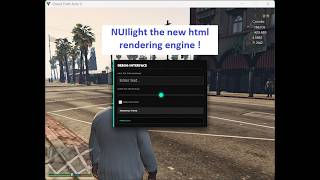
I implemented a web rendering engine in Gta V ( full HTML support -Latest version HTML5-, full CSS support -Latest version CSS3- and full support for JavaScript -Latest version ES6-)
Pros:
Integrating a web rendering engine like CEF (Chromium Embedded Framework available in the version 0.2) or Ultralight ( available in the version 0.1) directly into GTA V offers a massive leap in UI flexibility compared to standard game drawing methods. By leveraging HTML5, CSS3, and JavaScript, developers can create complex, modern interfaces such as interactive tablets, custom inventory systems, or animated HUDs with the same ease as building a website. This approach bypasses the rigid limitations of the game's native "Scaleform" (Flash-based) UI, allowing for high-performance hardware acceleration, full transparency support, and the ability to use powerful web libraries like React or Vue. Ultimately, it enables a "live" interface that can fetch real-time data from the internet or local scripts without causing the game to stutter or requiring a restart to update the visuals.
Installation instructions for version 0.1 and 0.2 are available in the zip files.
For developers : there is a developers folder that you might want to check out if you want to create web pages capable of interacting with the game .
Usage:
-Toggle the settings menu using F7 ( default ) to manage all the options and settings and you no longer need to edit the settings.ini file manually.
Known bugs:
-The version 0.2.4 isn't stable so it will probably contains multiple bugs, so let me know about them asap.
-important: if the url is correct but the browser says that it couldn't find it or load or showed any kinda of error, try reloading the page using F5 ( default can be changed in the settings menu)
Updated FAQ:
Why I switched from Ultralight to Cef
-Ultralight has problems and limitations
Why you need to use Ultralight version 0.1 instead of Cef version 0.2
-It's a light weight engine consuming around 10 to 20mb of ram without affecting the gameplay especially on low end devices like mine and it's capable of running 60fps.
Why you need to use Cef version 0.2 instead of Ultralight version 0.1
-It support the latest version of HTML, CSS and JavaScript but might cause performance issues on low end devices ( Note : I didn't update Ultralight Flavor of the project so old bugs are still there)
Update 0.2.4.2 :
-Patched a bug that cause a game crash due to repetitive resolution changing.
-Patched a major memory leak.
Update 0.2.4.1 :
-Did some small modifications so you no longer have to paste the binaries inside the game root folder. You have now to copy the settings.ini file, WebUI.asi file and the folder that contains the binaries cef-resources to the game root folder.
Important: MAKE SURE TO DELETE THE PREVIOUS INSTALLATION AND ESPECIALLY THE FILE CALLED "libcef.dll", it might cause a conflicts or crashes. If it prevents you from deleting it because another process is using it make sure to restart your computer and try deleting it again.
=> This patch was suggested by Lelac14 !
Update 0.2.4.0:
-Added countless engine tuning option so you can get the best performance.
-Added an in-game settings menu including new features : You can change the url and the keybindings live from the settings menu and apply them during runtime ( you will need to restart the game in order to apply all the other settings except the ones i mentioned early)
==>The rest of what i did is available in the settings menu with description.
Update 0.2.3:
- Added GPU Acceleration: New EnableGPU option in settings.ini (off by default). Turn on for better performance if you have a dedicated GPU.
- Rebranded the project: Now called WebUI (formerly NUILight) to avoid confusion between the real NUI and my tiny project :) .
Update 0.2.2:
- Full keyboard key support for ToggleVisibility and CaptureInput
- Graceful fallback if WebUI-Worker.exe is missing (no more worries from crashing or entering BSOD)
- Keyboard inputs now separate from mouse capture better for interactive demos
- Added ShowOnStart option in settings.ini
- License updated important changes for developers (see below)
Update 0.2.1:
- Fixed the known bugs seen in v0.1 and v0.2 ( browser visibility during the pause menu and the warning screens )
- Added a proper url fallback in case of the unavailability of the settings.ini file
- Added a proper freeze protocol to end the rendering when the game freezes
- Added EULA license to the project
Update 0.2:
- Using Chromium Embedded Framework (CEF) instead of Ultralight just like NUI used in FiveM.
- Fixed CSS and HTML limitations by the Cef upgrade.
What is next:
-I'll start working on a api to give the developers full control over the engine.
Legal:
WebUI is only available on GTA5-Mods. If you find it elsewhere, it's an unauthorized copy please download from the official page to ensure you have the correct, safe version. Thanks for supporting the original release.
Credits : ShadowOne
Note: WebUI is and always will be free. If you want to support development and help me upgrade from my potato laptop, donations are appreciated but never expected. : Ko-fi and Patreon
Note about Patreon: I added it lately if you want to support me, I'm not planning to publish any post through until i finish the API.
I implemented a web rendering engine in Gta V ( full HTML support -Latest version HTML5-, full CSS support -Latest version CSS3- and full support for JavaScript -Latest version ES6-)
Pros:
Integrating a web rendering engine like CEF (Chromium Embedded Framework available in the version 0.2) or Ultralight ( available in the version 0.1) directly into GTA V offers a massive leap in UI flexibility compared to standard game drawing methods. By leveraging HTML5, CSS3, and JavaScript, developers can create complex, modern interfaces such as interactive tablets, custom inventory systems, or animated HUDs with the same ease as building a website. This approach bypasses the rigid limitations of the game's native "Scaleform" (Flash-based) UI, allowing for high-performance hardware acceleration, full transparency support, and the ability to use powerful web libraries like React or Vue. Ultimately, it enables a "live" interface that can fetch real-time data from the internet or local scripts without causing the game to stutter or requiring a restart to update the visuals.
Installation instructions for version 0.1 and 0.2 are available in the zip files.
For developers : there is a developers folder that you might want to check out if you want to create web pages capable of interacting with the game .
Usage:
-Toggle the settings menu using F7 ( default ) to manage all the options and settings and you no longer need to edit the settings.ini file manually.
Known bugs:
-The version 0.2.4 isn't stable so it will probably contains multiple bugs, so let me know about them asap.
-important: if the url is correct but the browser says that it couldn't find it or load or showed any kinda of error, try reloading the page using F5 ( default can be changed in the settings menu)
Updated FAQ:
Why I switched from Ultralight to Cef
-Ultralight has problems and limitations
Why you need to use Ultralight version 0.1 instead of Cef version 0.2
-It's a light weight engine consuming around 10 to 20mb of ram without affecting the gameplay especially on low end devices like mine and it's capable of running 60fps.
Why you need to use Cef version 0.2 instead of Ultralight version 0.1
-It support the latest version of HTML, CSS and JavaScript but might cause performance issues on low end devices ( Note : I didn't update Ultralight Flavor of the project so old bugs are still there)
Update 0.2.4.2 :
-Patched a bug that cause a game crash due to repetitive resolution changing.
-Patched a major memory leak.
Update 0.2.4.1 :
-Did some small modifications so you no longer have to paste the binaries inside the game root folder. You have now to copy the settings.ini file, WebUI.asi file and the folder that contains the binaries cef-resources to the game root folder.
Important: MAKE SURE TO DELETE THE PREVIOUS INSTALLATION AND ESPECIALLY THE FILE CALLED "libcef.dll", it might cause a conflicts or crashes. If it prevents you from deleting it because another process is using it make sure to restart your computer and try deleting it again.
=> This patch was suggested by Lelac14 !
Update 0.2.4.0:
-Added countless engine tuning option so you can get the best performance.
-Added an in-game settings menu including new features : You can change the url and the keybindings live from the settings menu and apply them during runtime ( you will need to restart the game in order to apply all the other settings except the ones i mentioned early)
==>The rest of what i did is available in the settings menu with description.
Update 0.2.3:
- Added GPU Acceleration: New EnableGPU option in settings.ini (off by default). Turn on for better performance if you have a dedicated GPU.
- Rebranded the project: Now called WebUI (formerly NUILight) to avoid confusion between the real NUI and my tiny project :) .
Update 0.2.2:
- Full keyboard key support for ToggleVisibility and CaptureInput
- Graceful fallback if WebUI-Worker.exe is missing (no more worries from crashing or entering BSOD)
- Keyboard inputs now separate from mouse capture better for interactive demos
- Added ShowOnStart option in settings.ini
- License updated important changes for developers (see below)
Update 0.2.1:
- Fixed the known bugs seen in v0.1 and v0.2 ( browser visibility during the pause menu and the warning screens )
- Added a proper url fallback in case of the unavailability of the settings.ini file
- Added a proper freeze protocol to end the rendering when the game freezes
- Added EULA license to the project
Update 0.2:
- Using Chromium Embedded Framework (CEF) instead of Ultralight just like NUI used in FiveM.
- Fixed CSS and HTML limitations by the Cef upgrade.
What is next:
-I'll start working on a api to give the developers full control over the engine.
Legal:
WebUI is only available on GTA5-Mods. If you find it elsewhere, it's an unauthorized copy please download from the official page to ensure you have the correct, safe version. Thanks for supporting the original release.
Credits : ShadowOne
Note: WebUI is and always will be free. If you want to support development and help me upgrade from my potato laptop, donations are appreciated but never expected. : Ko-fi and Patreon
Note about Patreon: I added it lately if you want to support me, I'm not planning to publish any post through until i finish the API.
First Uploaded: March 15, 2026
Last Updated: 1 hour ago
Last Downloaded: 1 hour ago
All Versions
31 Comments
More mods by ShadowOne:

- HUD
- .Net
5.0
433
10
1.1.0
By ShadowOne
WebUI previously known as NUILight !
I implemented a web rendering engine in Gta V ( full HTML support -Latest version HTML5-, full CSS support -Latest version CSS3- and full support for JavaScript -Latest version ES6-)
Pros:
Integrating a web rendering engine like CEF (Chromium Embedded Framework available in the version 0.2) or Ultralight ( available in the version 0.1) directly into GTA V offers a massive leap in UI flexibility compared to standard game drawing methods. By leveraging HTML5, CSS3, and JavaScript, developers can create complex, modern interfaces such as interactive tablets, custom inventory systems, or animated HUDs with the same ease as building a website. This approach bypasses the rigid limitations of the game's native "Scaleform" (Flash-based) UI, allowing for high-performance hardware acceleration, full transparency support, and the ability to use powerful web libraries like React or Vue. Ultimately, it enables a "live" interface that can fetch real-time data from the internet or local scripts without causing the game to stutter or requiring a restart to update the visuals.
Installation instructions for version 0.1 and 0.2 are available in the zip files.
For developers : there is a developers folder that you might want to check out if you want to create web pages capable of interacting with the game .
Usage:
-Toggle the settings menu using F7 ( default ) to manage all the options and settings and you no longer need to edit the settings.ini file manually.
Known bugs:
-The version 0.2.4 isn't stable so it will probably contains multiple bugs, so let me know about them asap.
-important: if the url is correct but the browser says that it couldn't find it or load or showed any kinda of error, try reloading the page using F5 ( default can be changed in the settings menu)
Updated FAQ:
Why I switched from Ultralight to Cef
-Ultralight has problems and limitations
Why you need to use Ultralight version 0.1 instead of Cef version 0.2
-It's a light weight engine consuming around 10 to 20mb of ram without affecting the gameplay especially on low end devices like mine and it's capable of running 60fps.
Why you need to use Cef version 0.2 instead of Ultralight version 0.1
-It support the latest version of HTML, CSS and JavaScript but might cause performance issues on low end devices ( Note : I didn't update Ultralight Flavor of the project so old bugs are still there)
Update 0.2.4.2 :
-Patched a bug that cause a game crash due to repetitive resolution changing.
-Patched a major memory leak.
Update 0.2.4.1 :
-Did some small modifications so you no longer have to paste the binaries inside the game root folder. You have now to copy the settings.ini file, WebUI.asi file and the folder that contains the binaries cef-resources to the game root folder.
Important: MAKE SURE TO DELETE THE PREVIOUS INSTALLATION AND ESPECIALLY THE FILE CALLED "libcef.dll", it might cause a conflicts or crashes. If it prevents you from deleting it because another process is using it make sure to restart your computer and try deleting it again.
=> This patch was suggested by Lelac14 !
Update 0.2.4.0:
-Added countless engine tuning option so you can get the best performance.
-Added an in-game settings menu including new features : You can change the url and the keybindings live from the settings menu and apply them during runtime ( you will need to restart the game in order to apply all the other settings except the ones i mentioned early)
==>The rest of what i did is available in the settings menu with description.
Update 0.2.3:
- Added GPU Acceleration: New EnableGPU option in settings.ini (off by default). Turn on for better performance if you have a dedicated GPU.
- Rebranded the project: Now called WebUI (formerly NUILight) to avoid confusion between the real NUI and my tiny project :) .
Update 0.2.2:
- Full keyboard key support for ToggleVisibility and CaptureInput
- Graceful fallback if WebUI-Worker.exe is missing (no more worries from crashing or entering BSOD)
- Keyboard inputs now separate from mouse capture better for interactive demos
- Added ShowOnStart option in settings.ini
- License updated important changes for developers (see below)
Update 0.2.1:
- Fixed the known bugs seen in v0.1 and v0.2 ( browser visibility during the pause menu and the warning screens )
- Added a proper url fallback in case of the unavailability of the settings.ini file
- Added a proper freeze protocol to end the rendering when the game freezes
- Added EULA license to the project
Update 0.2:
- Using Chromium Embedded Framework (CEF) instead of Ultralight just like NUI used in FiveM.
- Fixed CSS and HTML limitations by the Cef upgrade.
What is next:
-I'll start working on a api to give the developers full control over the engine.
Legal:
WebUI is only available on GTA5-Mods. If you find it elsewhere, it's an unauthorized copy please download from the official page to ensure you have the correct, safe version. Thanks for supporting the original release.
Credits : ShadowOne
Note: WebUI is and always will be free. If you want to support development and help me upgrade from my potato laptop, donations are appreciated but never expected. : Ko-fi and Patreon
Note about Patreon: I added it lately if you want to support me, I'm not planning to publish any post through until i finish the API.
I implemented a web rendering engine in Gta V ( full HTML support -Latest version HTML5-, full CSS support -Latest version CSS3- and full support for JavaScript -Latest version ES6-)
Pros:
Integrating a web rendering engine like CEF (Chromium Embedded Framework available in the version 0.2) or Ultralight ( available in the version 0.1) directly into GTA V offers a massive leap in UI flexibility compared to standard game drawing methods. By leveraging HTML5, CSS3, and JavaScript, developers can create complex, modern interfaces such as interactive tablets, custom inventory systems, or animated HUDs with the same ease as building a website. This approach bypasses the rigid limitations of the game's native "Scaleform" (Flash-based) UI, allowing for high-performance hardware acceleration, full transparency support, and the ability to use powerful web libraries like React or Vue. Ultimately, it enables a "live" interface that can fetch real-time data from the internet or local scripts without causing the game to stutter or requiring a restart to update the visuals.
Installation instructions for version 0.1 and 0.2 are available in the zip files.
For developers : there is a developers folder that you might want to check out if you want to create web pages capable of interacting with the game .
Usage:
-Toggle the settings menu using F7 ( default ) to manage all the options and settings and you no longer need to edit the settings.ini file manually.
Known bugs:
-The version 0.2.4 isn't stable so it will probably contains multiple bugs, so let me know about them asap.
-important: if the url is correct but the browser says that it couldn't find it or load or showed any kinda of error, try reloading the page using F5 ( default can be changed in the settings menu)
Updated FAQ:
Why I switched from Ultralight to Cef
-Ultralight has problems and limitations
Why you need to use Ultralight version 0.1 instead of Cef version 0.2
-It's a light weight engine consuming around 10 to 20mb of ram without affecting the gameplay especially on low end devices like mine and it's capable of running 60fps.
Why you need to use Cef version 0.2 instead of Ultralight version 0.1
-It support the latest version of HTML, CSS and JavaScript but might cause performance issues on low end devices ( Note : I didn't update Ultralight Flavor of the project so old bugs are still there)
Update 0.2.4.2 :
-Patched a bug that cause a game crash due to repetitive resolution changing.
-Patched a major memory leak.
Update 0.2.4.1 :
-Did some small modifications so you no longer have to paste the binaries inside the game root folder. You have now to copy the settings.ini file, WebUI.asi file and the folder that contains the binaries cef-resources to the game root folder.
Important: MAKE SURE TO DELETE THE PREVIOUS INSTALLATION AND ESPECIALLY THE FILE CALLED "libcef.dll", it might cause a conflicts or crashes. If it prevents you from deleting it because another process is using it make sure to restart your computer and try deleting it again.
=> This patch was suggested by Lelac14 !
Update 0.2.4.0:
-Added countless engine tuning option so you can get the best performance.
-Added an in-game settings menu including new features : You can change the url and the keybindings live from the settings menu and apply them during runtime ( you will need to restart the game in order to apply all the other settings except the ones i mentioned early)
==>The rest of what i did is available in the settings menu with description.
Update 0.2.3:
- Added GPU Acceleration: New EnableGPU option in settings.ini (off by default). Turn on for better performance if you have a dedicated GPU.
- Rebranded the project: Now called WebUI (formerly NUILight) to avoid confusion between the real NUI and my tiny project :) .
Update 0.2.2:
- Full keyboard key support for ToggleVisibility and CaptureInput
- Graceful fallback if WebUI-Worker.exe is missing (no more worries from crashing or entering BSOD)
- Keyboard inputs now separate from mouse capture better for interactive demos
- Added ShowOnStart option in settings.ini
- License updated important changes for developers (see below)
Update 0.2.1:
- Fixed the known bugs seen in v0.1 and v0.2 ( browser visibility during the pause menu and the warning screens )
- Added a proper url fallback in case of the unavailability of the settings.ini file
- Added a proper freeze protocol to end the rendering when the game freezes
- Added EULA license to the project
Update 0.2:
- Using Chromium Embedded Framework (CEF) instead of Ultralight just like NUI used in FiveM.
- Fixed CSS and HTML limitations by the Cef upgrade.
What is next:
-I'll start working on a api to give the developers full control over the engine.
Legal:
WebUI is only available on GTA5-Mods. If you find it elsewhere, it's an unauthorized copy please download from the official page to ensure you have the correct, safe version. Thanks for supporting the original release.
Credits : ShadowOne
Note: WebUI is and always will be free. If you want to support development and help me upgrade from my potato laptop, donations are appreciated but never expected. : Ko-fi and Patreon
Note about Patreon: I added it lately if you want to support me, I'm not planning to publish any post through until i finish the API.
First Uploaded: March 15, 2026
Last Updated: 1 hour ago
Last Downloaded: 1 hour ago
 5mods on Discord

If you encountered any crashes please downgrade to the previous stable version until I release a patch ASAP 🙏
@ShadowOne Sounds great.Yeah, I mentioned Hypnonema/videos in an earlier post and while we don't need to replicate its functionality, introducing video play would be huge. As for draw methods, my comment was really aimed at your script. I realize it was a just a proof of concept but it didn't sell the potential. Scaling is one great advantage the other is the overall issues with sprites and custom sprites. They are a PITA because one is uses normal screen coords, the other uses a 0,1 coordsystem - both which can be normalized. And also a PITA is the fact that R* centers at the top left of a rectangle.
Your work for SP, to bring this UI area to FiveM levels, will greatly enhance modding GTA V (no pun intended). The other revolution, which is banned by the admins on this site, will be AI. I already saw a team on Youtube doing actual role play with chat servers and text conversion to speech (TTS).
@lelac14 Really appreciate you taking the time to write this out — seriously. Feedback like this helps me focus on what actually matters to people using the framework.
You're spot on about sprites. The coordinate system mess and Rockstar's weird centering is exactly why I started this whole thing. HTML/CSS layout just makes sense. No more guessing where things render.
On video playback — CEF handles it natively, so once the API is locked in, that's an easy win. Not promising anything yet, but it's on the radar.
Also, just dropped 0.2.1 with the pause menu/warning screen visibility fixes (finally), a freeze protocol to prevent crashes, and proper fallback if the config file goes missing. Small changes, but they make the whole thing feel way more solid.
Bringing SP closer to FiveM's UI capabilities is the goal. Keep the thoughts coming. This is the kind of conversation that pushes things forward.
@lelac14 I forgot to ask, can you give me demo ideas i can create to showcase the engine ? I already made a phone script so i need other inspirations please !
@ShadowOne Hi. Created this account just to let you know this is a very interesting initiative. We are a dev team of 3 guys and 1 gal. One area of focus for our team is the development of innovative user interfaces. You can see a sample of our text only menu (animated text) here. We will be following this closely. Good luck and cheers from Canada.
https://www.youtube.com/watch?v=dDXpDv7uVEA
@TeamCharlotte Hello. The animated wardrobe script looks impressive, you were capable of animating the menu without using NativeUI or LemonUI. I really want to see a demo of your project using my engine. Good Luck !
@ShadowOne Some suggestions:
1. A HUD/Menu interface sort of like Assetto Corsa but with the ability to switch based on the context.
2. Spawner: preview and spawn entities (peds, props, vehicles)
3. Entity specific app: Vehicle customizer, Ped customizer etc
4. Inventory system
5. Down the road: video and also audio using multi function players)
All of these exist, all have boring AsF NativeUI or LemonUI or shitty looking C++ asi menus.
Idea would be to elevate these for cosmetics and overall user experience.
Flexibility is important, so user would have very simple ini and setting text files to populate menus or HUDs.
@ShadowOne
Also, if you want to add something cool but elevating the complexity, you could use system reflection or something similar so that user could call other scripts. User would enter name of assembly and would need to know the method, and then your HUD or menu system would call and run that script mod in real time.
Of course the weak link here is the user would need to know the method, for example Void OpenMenu, so other devs would need to cooperate. Or the dumb solution, lol, is to use a sendkeys wait (C#) to call common keys such as F keys
Interested in adding in-game 3D html drawing?
@JoyLucien CEF (the browser engine behind WebUI) supports WebGL, so 3D HTML rendering is technically possible. Not something I'm actively working on right now — current focus is stability, the API, and the in-game settings menu. But definitely an interesting direction for the future.
@ShadowOne It might be a translation issue; I meant drawing HTML in the 3D world of a game. Are you interested?
@JoyLucien Yes, I am! It would require hooking into the existing DirectX device, identifying the target texture to swap, and converting the browser's pixel buffer into a texture — same approach as Hypnonema but with WebUI as the renderer. Definitely possible long-term, but not my current focus. Are you thinking of building something like that?
@lelac14 Hello, can you check the latest update ? let me know if you had bugs !
@ShadowOne Will test as soon as I have a chance. Also, as discussed, would be great if you could dump all your files in one folder which goes in root. Leave asi in with its ini,
@lelac14 Hello, i need to check the ability to doing that in Cef or I'll need to that indirectly. Don't expect any new updates until the end of this week because i'm a student and I just got back to the Uni !
@lelac14 Hello. It turned out to be a quick patch so i did it anyway, check the latest version 0.2.4.1. I appreciate your feedback, let me know if you have any other improvements ! ( The Api is still in work! )
Interested in adding in-game 3D html drawing?
@ShadowOne CORE: An exception occurred while executing 'WebUI.asi', id 6
Exception addr 0x00007FFBDB0A1E6E is dxgi.dll+0x00031E6E
@lelac14 I'm really sorry for the crash, can you downgrade to the previous version until I release a patch this weekend ? I'm really busy during the week !
your mod doesnt work when i create a local website on my pc
no instructions in the fresh installer too